Why spectrogram preview matters for large IQ datasets
Large IQ captures are expensive to move and slow to inspect. A spectrogram preview helps teams answer the first practical question before they download the whole file: is this capture worth opening?
The old workflow starts with a guess
A familiar RF data workflow starts with a guess.
Someone needs an old capture from a test event, lab run, field collection, or analysis task. They search the shared drive, object bucket, or project folder. They find a file that looks close enough. The name has the right date, maybe the right sensor, maybe the right project code.
Then they download it.
That may mean moving tens or hundreds of gigabytes across the network. It may mean waiting on a restricted share, pulling from object storage, copying to local scratch space, and hoping the workstation has enough room. After that, they open local tooling, point it at the file, set the right parameters, and finally look at the signal.
Then they find out it was the wrong capture.
Or the right capture but the wrong time range. Or the useful signal is not present. Or the interesting part is much shorter than the file. Or the capture was already processed elsewhere and nobody saw the derived output before starting over.
The wasted time is obvious. The less obvious cost is that people start protecting themselves from the workflow. They make local copies. They keep their own folders. They avoid deleting anything. They ask the person who might remember instead of trusting the archive.
That is why spectrogram preview matters.
The first question is simple
Before deeper analysis starts, an engineer often needs to answer a smaller question: is this capture worth opening?
That question comes before demodulation, classification, detection, annotation, reporting, or model training. It is a triage question. It asks whether the file probably contains the signal, time range, or behavior the team is looking for.
For large IQ datasets, answering that question by downloading the full capture is expensive. The file may be too large for quick movement. The local environment may not be set up. The user may not know the exact sample format. The capture may be one of many similar files from the same event.
A preview does not need to solve the whole analysis problem. It needs to keep the team from doing unnecessary work before the real work begins.
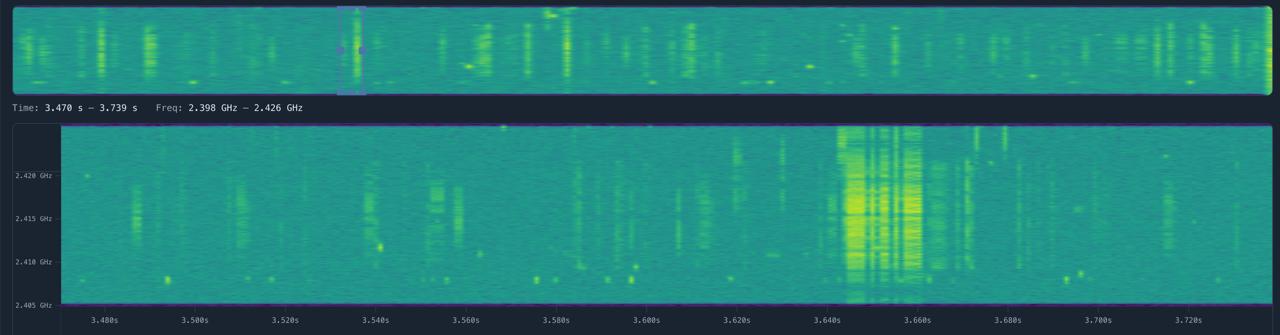
Why spectrograms are useful for preview
A spectrogram gives RF teams a fast visual summary of energy over frequency and time.
That makes it useful for triage. Engineers can often see whether a capture has activity in the expected band, whether the time window looks right, whether there are obvious gaps, whether the signal is intermittent or continuous, whether the recording appears clipped or noisy, and whether the file deserves a closer look.
The point is not that a spectrogram tells the whole story. It does not.
A preview can still answer the first practical question. If the signal is visibly absent, the engineer can move on. If the interesting activity is present but only in a short interval, the team can focus on that interval. If the capture looks corrupted or empty, nobody needs to spend an hour pulling it into local tooling before learning that.
This matters more as datasets grow. A five-minute mistake is annoying. A half-day mistake caused by moving and opening the wrong file is a workflow problem.
Preview is not analysis
Spectrogram preview has limits, and the limits matter.
A preview may be downsampled, windowed, summarized, or generated with parameters that trade detail for speed. It may show energy that still needs deeper interpretation. It may miss details that only show up with the right processing chain. It may be a starting point for analysis, not evidence by itself.
That is fine. The preview is not meant to replace MATLAB, GNU Radio, Python notebooks, signal processing pipelines, or domain-specific tools.
It is meant to sit earlier in the workflow.
The job of preview is to help people decide what to open, what to skip, what to prioritize, and what to hand off. It should help an engineer or program lead look at a capture record and say, 'This is probably the one,' or 'No, keep searching.'
That small decision saves time when it happens hundreds of times across a dataset.
Preview also helps metadata make sense
Metadata and preview work better together.
Metadata can tell you the center frequency, sample rate, bandwidth, timestamp, sensor, collection event, or handling notes. A spectrogram can show whether the visible signal behavior matches what the metadata suggests.
If the metadata says a capture covers a certain band, the preview can help confirm that the file appears relevant before anyone downloads it. If the metadata is incomplete, the preview can still give the team a visual cue. If the preview shows unexpected activity, the team can add notes, annotations, or links to derived analysis.
This does not make metadata optional. It makes metadata easier to trust and easier to use.
The best workflow is not a giant folder of files with no context. It is a capture record where the metadata, preview, access history, and derived outputs stay connected.
Why this matters in secure environments
In secure labs, test ranges, and defense or government environments, moving data is rarely free.
Large captures may live on restricted networks. Some teams cannot use public cloud tools. Some systems are air-gapped. Access may depend on program, customer, classification, role, or need to know. Even when transfer is allowed, moving the wrong file wastes network time, local storage, analyst attention, and review effort.
Preview helps because it reduces unnecessary movement.
If a user can inspect a lightweight spectrogram preview inside the controlled environment, they may not need to pull the full capture until they have a reason. If a program manager can understand that a dataset contains the expected collection window without opening the raw file, the conversation gets easier. If an analyst can compare candidate captures visually before choosing one, fewer copies get created just in case.
The operational value is not flashy. It is practical: fewer wrong downloads, less duplicate data, faster triage, and better use of analyst time.
How we think about this in SigDrive
SigDrive is being built for teams that need large RF captures to remain findable, understandable, and reusable after collection.
Spectrogram preview is part of that direction. The goal is to let teams inspect large IQ captures before moving the full file into a separate toolchain. Preview should sit next to the capture record, metadata, access controls, audit history, and links to derived analysis.
We should be careful not to overstate it. A preview does not replace signal analysis. It does not prove what a signal is. It does not recover missing context. It does not remove the need for the tools RF engineers already trust.
But it can make the first step much less painful.
If a team can search by RF-relevant metadata, open a preview, decide whether the capture is worth deeper work, and keep that decision connected to the original record, the data lake starts to support the way RF teams actually work.
That is the direction we are taking with SigDrive.
If your team is dealing with large IQ captures that are hard to preview, hard to move, or hard to trust later, we would like to compare notes.
Working through this problem?
We are opening early conversations with RF teams dealing with large captures, duplicated files, messy metadata, preview pain, and secure deployment constraints.